Getting Started With GitLab Registries
Like all gentlemen seeking to keep their standing in society I maintain a system of continuous integration ( CI ) pipelines, docker images and git repositories to keep in good order but over time these can become disjointed.
I’ve found that Gitlab allows you to integrate these together and host on your own infrastructure, it’s a nice fit for managing source code and deployments.
Here I’m going to walk through setting up a docker image repository on your gitlab instance, I’ll refer to the url of the hosted gitlab instance as $GITLAB_URL.
First step log in to your gitlab instance and navigate to groups and click on ‘New group’
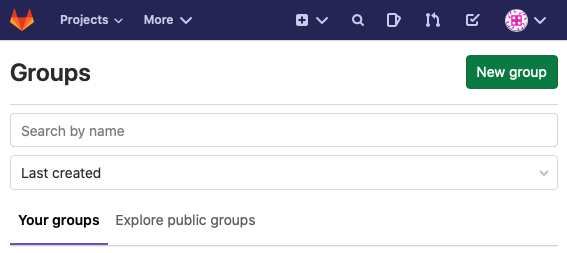
Create a new group called ‘test’ and navigate to its group overview page, click on ‘New Project’ and give the project name ‘test_project’.
In order to access the registry to add and pull images we need to create an access token, navigate to $GITLAB_URL/profile/personal_access_tokens and select “readregistry” and “writeregistry”.
Save the token to your local machine and test your access by logging in to docker with your gitlab url and the access token
docker login $GITLAB_URL --username $GITLAB_USERNAME --password $ACCESS_TOKENAs long as you can log in you should now be able to push images to your registry, let's build a simple docker project by pulling nginx and tagging it with the url of our registry.
To start create a directory for our test project and create a Dockerfile
mkdir gitlab_example && cd gitlab_example
touch Dockerfile
Edit the docker file to include
FROM nginx:latestNavigate to $GITLAB_URL/test_group/test_project/container_registry and click on ‘cli commands’ you should see instructions listing the registry url for our test project along with the docker commands to run them.
Within your gitlab_example directory run
docker build -t $REGISTRY_URL .Once built push the image to your registry with
docker push $REGISTRY_URLNow you’ve got a test container to deploy and experiment with
Thanks for reading
Please get in touch by email or by twitter if you have any questions or follow ups